Book & dispatch field crews — right inside ChatGPT
Crisphive's official ChatGPT app puts your live dispatch board in the conversation — book jobs, check availability, rehearse emergencies before they happen. ChatGPT interprets what you ask; Crisphive's deterministic solver computes every change in under 3 seconds.
In the ChatGPT apps directory as “Book & dispatch field crews” — OAuth sign-in, backed by Crisphive's hosted MCP server, nothing to run or self-host.
ChatGPT takes the request. Crisphive does the math.
1
Install the app
Add Crisphive from the ChatGPT apps directory and sign in with OAuth as the business owner — the hosted server does the rest.
2
Ask in plain language
“Rehearse tomorrow with one tech out sick.” ChatGPT turns your intent into tool calls against your live schedule — no syntax, no query language.
3
Review and approve
Crisphive's deterministic solver computes the cascade — travel, skills, breaks and SLAs as hard constraints — and ChatGPT presents the plan and its trade-offs before anything is committed.
The same request sounds different coming from a dispatcher, a developer or an owner — ChatGPT understands all three and hands the math to the solver. Pick your voice and copy.
Try these first
Paste one into ChatGPT right after installing the app.
1
Rehearse tomorrow with one tech out sick — show me what cascades.
2
Book a 90-minute electrical inspection at 310 Somerset St W Thursday morning for Priya Nair, 613-555-0173.
3
Which crews are overbooked this week, and where do I have slack?
More prompts, in your voice
Sick-day rehearsal
Rehearse tomorrow with Marc out sick — reassign his jobs and show me the cascade before anything moves.
Simulate tomorrow with technician marc.f unavailable all day. Run the cascade reschedule in preview mode and return jobs moved, new ETAs and SLA impact — do not commit.
If Marc calls in sick tomorrow, do we still keep every commitment — and if not, which customers do I need to call?
Dispatch & availability, crews & rosters, work orders — preview only; nothing commits until you approve.
Vehicle breakdown
Van 3 just broke down on Carling Ave. Redistribute its remaining jobs for today and show me what slips.
Mark vehicle VAN-3 out of service effective now. Cascade its remaining assignments across qualified crews and return the dual plan: jobs moved, new ETAs, SLA breaches.
We lost a van for the rest of the day. What does it cost us in missed windows, and what's the least-bad plan?
Fleet, dispatch & availability, job booking — returns the full cascade for approval.
Quote & book from the catalog
Quote a water heater replacement from our catalog for Priya Nair at 310 Somerset St W and book the first slot next week that fits a licensed plumber.
Look up service=WATER_HEATER_REPLACEMENT in the catalog — duration and price — then create the job for customer=Priya Nair, phone=613-555-0173, location=310 Somerset St W, window=next week, skill=PLUMBER_LICENSED. Return the placement rationale.
Priya Nair (613-555-0173) wants a water heater replaced at 310 Somerset St W. What do we charge, how long does it take, and when can we realistically do it next week?
My 10am at 87 Preston St is a no-show. Fill the gap with something nearby and push their visit to the next available window.
Cancel the 10:00 job at 87 Preston St with reason=NO_SHOW, rebook the customer's next feasible window, and backfill the freed slot with the nearest pending job. Return both placements.
The 10 o'clock didn't answer the door. Make that hole in the schedule earn something — and get the customer rebooked without breaking the rest of the day.
Which crews are overbooked this week, which have slack, and where would one more emergency actually fit?
Return utilization per crew for this week with overcommitted days flagged, plus ranked windows that could absorb an unplanned 2h P1 job without SLA breaches.
Are we overcommitted anywhere this week — and if a big emergency lands, can we take it, or should sales stop promising this-week slots?
Crews & rosters, dispatch & availability — read-only; nothing on the board moves.
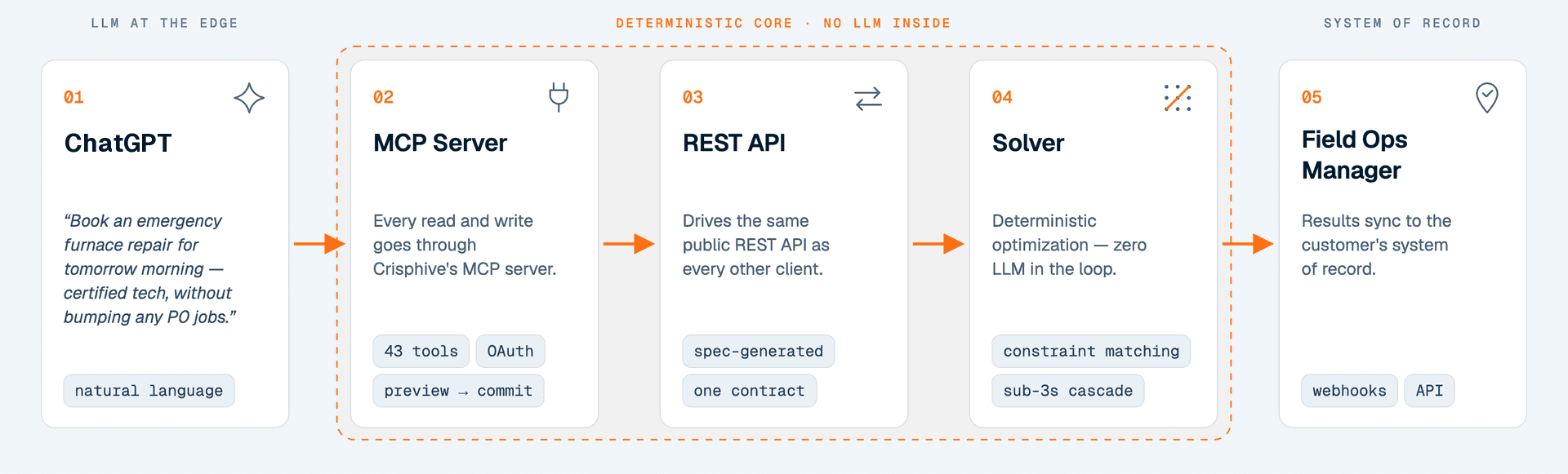
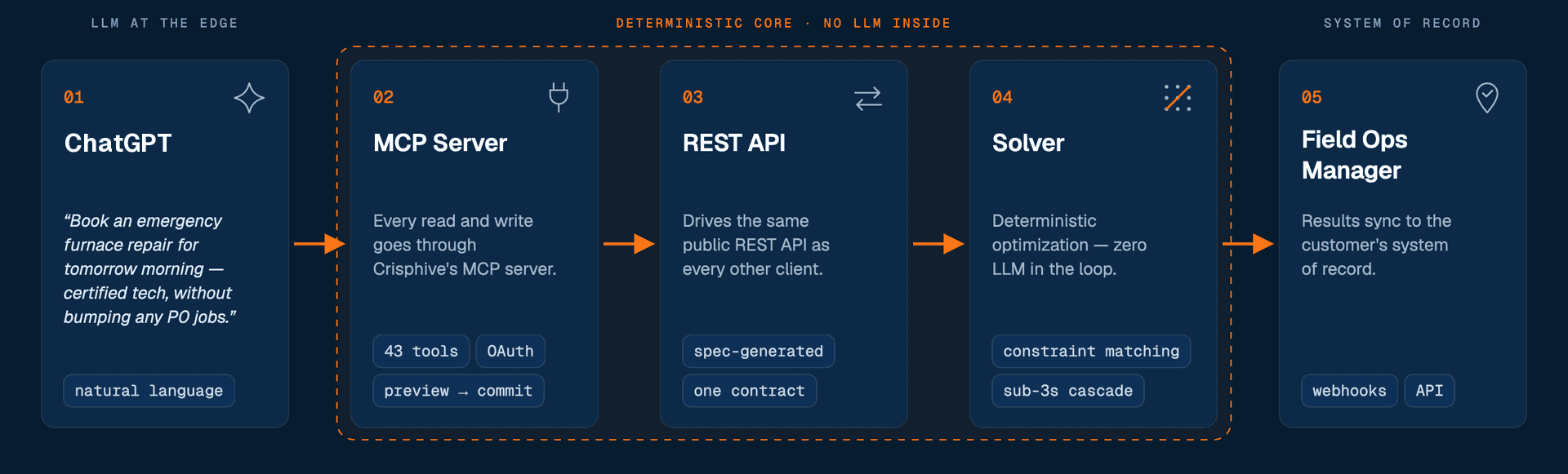
A language model can draft an email; it should not place your jobs. In the Crisphive app, ChatGPT only interprets the request — every booking, cascade and reschedule is computed by the same deterministic constraint solver that runs the live dispatch board. Ask twice, get the same plan twice.
One request's path — the model stays at the edges; the solver owns the schedule.
<3sto compute a full cascade reschedule
43scheduling tools behind one URL
0hallucinated schedules — plans come from the solver, not the LLM
Cascade reschedules solve in under 3 seconds, measured on a 20-location, 3-vehicle Ottawa fleet simulation with mobilization, travel time, supply runs and breaks as hard constraints.
One listing, one OAuth sign-in. A sandbox API key (chsk_test_…) gives an isolated test environment when you'd rather rehearse than touch the live schedule.
On plans that allow custom MCP connectors, add Crisphive by URL instead: paste the server URL into ChatGPT's connector settings and authorize with the same OAuth flow.
https://api.crisphive.com/mcp
Testing without touching the live schedule
Prefer a rehearsal space? A sandbox API key (chsk_test_…) runs the same 43 tools against an isolated test environment — setup lives in the developer docs.
Using another MCP client? The full client table (Claude, Gemini CLI, Windsurf, Cline, Zed, LM Studio) lives in the GitHub README and the developer docs.
Plumbing, HVAC, electrical, property maintenance — the dispatch-heavy verticals Crisphive already schedules, now bookable from a ChatGPT thread under the same hard constraints.
Least access, explicit approval — the app sees only what its tools expose.
OAuth, no keys in chat
Installing the app signs you in through OAuth as the business owner — no API keys pasted into chat. Revoke access anytime from ChatGPT's app settings or from your Crisphive account.
Scheduling data only
Tools cover jobs, work orders, customers, crews, catalogs, territories and fleet. Billing and payment data are never exposed — and the app never reads your ChatGPT conversation history.
Plans before changes
Anything that touches existing work comes back as a reviewable plan — jobs moved, new ETAs, SLA impact — and commits only after you approve it.
It's the official Crisphive app in the ChatGPT apps directory — listed as “Book & dispatch field crews” — backed by the same hosted MCP server at https://api.crisphive.com/mcp that serves every assistant. Installing it gives ChatGPT 43 tools for job booking, work orders, dispatch availability, customers, service catalogs, crew rosters, service territories and fleet.
How do I install Crisphive in ChatGPT?
Open the Crisphive listing in the ChatGPT apps directory, install it, and sign in as the Crisphive business owner when the OAuth consent screen opens. On plans that allow custom MCP connectors, you can instead paste https://api.crisphive.com/mcp into ChatGPT's connector settings.
Does the app cost extra? Do I need a paid ChatGPT plan?
Crisphive never bills for it: MCP access is included on every business plan and on the free developer sandbox, and MCP calls, cascades and reads are never counted. Whether apps and connectors are available on ChatGPT's side depends on your ChatGPT plan.
Is this different from the Claude connector?
Same server, same 43 tools, same deterministic solver — only the assistant changes. Crisphive is also in the Claude connectors directory, and any MCP client that speaks Streamable HTTP can connect to the same endpoint.
Is the scheduling done by AI?
No — and that's the point. ChatGPT interprets what you ask; the schedule itself is computed by Crisphive's deterministic constraint solver. Same input, same schedule, every time — a language model never places, moves or invents a job.
Can ChatGPT reschedule jobs without my approval?
No. Changes that touch existing work come back as a plan first: ChatGPT shows which jobs move, the new ETAs and the SLA impact, and nothing is committed until you approve it.
What data does the app access?
Only your Crisphive scheduling data, through OAuth as the business owner: jobs, work orders, customers, crews, service catalogs, territories and fleet. Billing and payment data are not exposed, the app never reads your ChatGPT conversation history, and a sandbox API key keeps experiments in an isolated test environment.
Is this related to Crisp or Krisp?
No. Crisphive is field operations scheduling software — dispatch, routing, crew scheduling and work orders — built by WicWac Inc. in Ottawa, Canada. It is unrelated to Crisp (the customer-support messaging platform) and Krisp (the noise-cancellation app).
Your schedule, audited in 48 hours
Send us one real day from your dispatch board. We rebuild it with the same deterministic solver behind this connector and show you the billable hours you left on the table.