Parlez à votre planning. Claude demande. Crisphive répond — de façon déterministe.
Le connecteur Crisphive permet à Claude de lire votre planning d'opérations terrain en direct et d'agir dessus — réserver des interventions, vérifier les disponibilités et replanifier autour des urgences, en langage courant. Claude interprète votre demande ; le solveur déterministe de Crisphive calcule chaque changement en moins de 3 secondes.
https://api.crisphive.com/mcp
Serveur distant hébergé via Streamable HTTP — OAuth ou une clé API Sandbox, rien à installer.
Ajoutez le connecteur Crisphive dans les paramètres de Claude et connectez-vous via OAuth en tant que propriétaire de l'entreprise — serveur distant hébergé, rien à installer ni à exécuter.
2
Demander en langage courant
« Insère une intervention d'urgence P0 à 14 h et montre-moi ce qui cascade. » Claude transforme votre intention en appels d'outils sur votre planning en direct.
3
Le solveur calcule, Claude explique
Le solveur déterministe de Crisphive calcule la cascade — trajets, compétences, pauses et SLA comme contraintes dures — et Claude explique le plan et ses compromis avant toute validation.
De vrais prompts sur un planning réel. La même demande ne se formule pas pareil chez un répartiteur, un développeur et un dirigeant — Claude comprend les trois. Choisissez votre voix et copiez.
Essayez d'abord ceux-ci
Collez-en un dans Claude juste après la connexion — les trois mêmes prompts que dans la fiche du répertoire.
1
Planifie demain une intervention CVC de 2 heures au 145 Laurier Ave W pour Marie Tremblay, 613-555-0142.
2
Intervention de plomberie d'urgence maintenant au 99 Bank St pour David Okafor (613-555-0198) — montre-moi ce qui est replanifié.
3
Décris ma journée de demain et signale tout ce qui est à risque.
Plus de prompts, dans votre voix
Insertion d'urgence
Insère tout de suite une intervention d'urgence P0 au 99 Bank Street pour David Okafor (613-555-0198) — canalisation éclatée, il faut un plombier agréé — et montre-moi ce qui est replanifié pour faire de la place.
Insère maintenant une intervention P0 au 99 Bank St, customer=David Okafor, phone=613-555-0198, skill=PLUMBER_LICENSED. Lance la replanification en cascade et renvoie le double plan : interventions déplacées, nouveaux ETA et impact total sur les SLA.
David Okafor (613-555-0198) a une urgence de canalisation éclatée au 99 Bank Street. Envoie un plombier agréé maintenant et dis-moi quels clients sont décalés et l'effet sur les engagements du jour.
Répartition et disponibilité, réservation d'interventions, ordres de travail — renvoie le double plan avec chaque déplacement en cascade, pour approbation.
Recherche de disponibilité
Trouve dans ma semaine de travail un créneau de 3 heures où je peux faire du vélo avec ma femme sans mettre une seule intervention en danger.
Cherche dans ma semaine un bloc personnel de 3 h d'affilée qui garde toutes les interventions faisables — aucun dépassement de SLA, aucune cascade nécessaire. Renvoie les créneaux candidats classés par marge du planning.
Quand cette semaine puis-je faire du vélo avec ma femme sans que rien ne glisse dans le planning ?
Répartition et disponibilité — classe les créneaux libres par marge du planning ; rien ne bouge sur le tableau.
Création d'intervention
Planifie demain après-midi une intervention d'entretien CVC de 2 heures au 145 Laurier Ave W pour Marie Tremblay (613-555-0142) et affecte le technicien disponible le plus proche.
Crée une intervention : 2 h de durée, lieu 145 Laurier Ave W, skill=HVAC_MAINT, window=tomorrow 12:00–17:00, customer=Marie Tremblay, phone=613-555-0142. Affecte le technicien qualifié le plus proche et renvoie la justification du placement.
Réserve demain après-midi une visite d'entretien CVC de 2 heures au 145 Laurier Ave W pour Marie Tremblay, 613-555-0142, avec celui qui y arrive avec le moins de trajet.
Réservation d'interventions et rendez-vous, synchronisation clients, répartition et disponibilité.
Aperçu de la journée
Décris mon planning de demain en signalant les trajets serrés et les interventions qui risquent de déborder.
Renvoie le planning de demain pour mon équipe sous forme de chronologie ordonnée, avec les trajets, la marge par intervention et le signalement de toute violation de contrainte ou SLA à risque.
Donne-moi un résumé en langage simple de demain pour toutes mes équipes — où sont les risques, et si nous avons promis trop quelque part.
Répartition et disponibilité, suivi des ordres de travail — lecture seule ; rien ne change.
Correspondance compétences et trajets
Lesquels de mes techniciens certifiés en installation de gaz sont libres jeudi matin à moins de 20 minutes de Kanata ?
Liste les techniciens avec cert=GAS_FITTING, disponibles jeudi 08:00–12:00, temps de trajet ≤20 min jusqu'à Kanata. Inclus le taux d'utilisation actuel par technicien.
Ai-je quelqu'un de qualifié en installation de gaz qui pourrait raisonnablement couvrir une intervention à Kanata jeudi matin sans casser sa tournée ?
Équipes et effectifs, zones de service, répartition et disponibilité.
43 outils sur la Crisphive Developer API /v1, regroupés selon ce que votre agent cherche à faire — chacun respecte les mêmes contraintes strictes que le tableau réel.
Réservation d'interventions et rendez-vous
Créez, confirmez et replanifiez des rendez-vous en fonction de la disponibilité réelle des équipes.
Suivi des ordres de travail
Ouvrez, mettez à jour et suivez les ordres de travail de bout en bout, avec un statut qui reflète le tableau de répartition.
Répartition et disponibilité
Demandez au moteur de répartition et de planification en direct qui peut prendre une intervention, et quand.
Synchronisation clients (CRM)
Synchronisez les fiches clients pour que les réservations arrivent sur le bon compte avec le bon historique.
Catalogues de services
Parcourez les services, les durées et les tarifs à partir desquels votre agent peut établir un devis.
Équipes et effectifs
Effectifs des techniciens et des équipes, avec les compétences et les certifications qui pilotent l'association.
Zones de service
Zones de service géographiques, appliquées comme des contraintes de planification — pas comme des suggestions.
Flotte
Capacités des véhicules et données de flotte qui déterminent quelle équipe peut prendre quelle intervention.
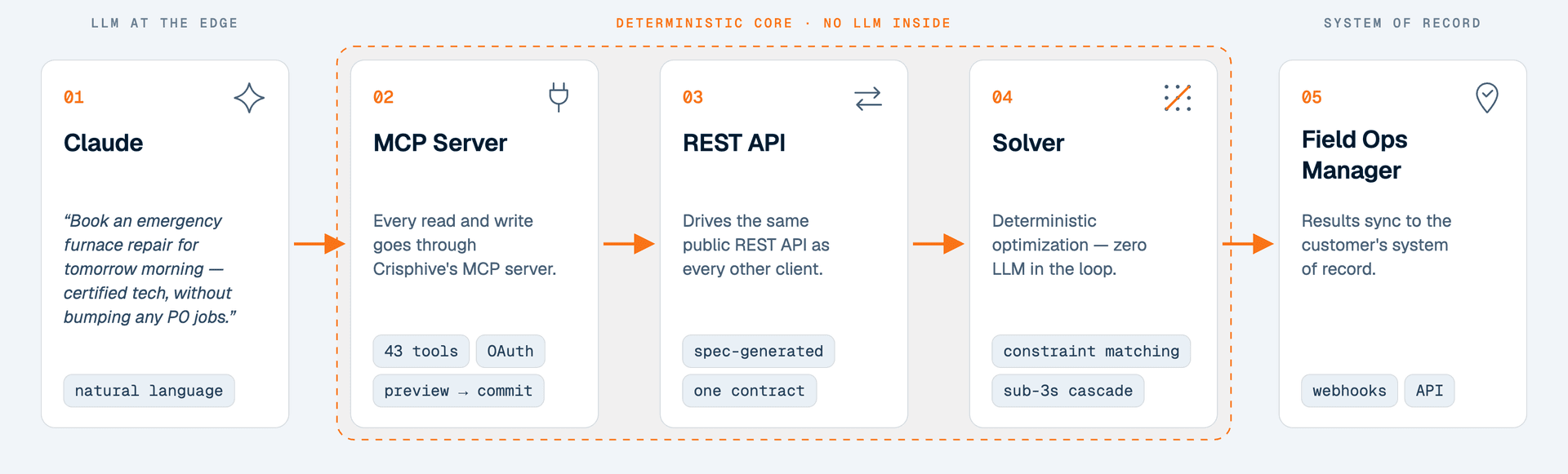
Claude n'invente jamais votre planning. Chaque réservation, chaque cascade et chaque replanification est calculée par le solveur sous contraintes de Crisphive — le même moteur déterministe qui fait tourner le tableau de répartition réel. Posez deux fois la même question, vous obtenez deux fois le même plan : le modèle de langage interprète, le solveur décide.
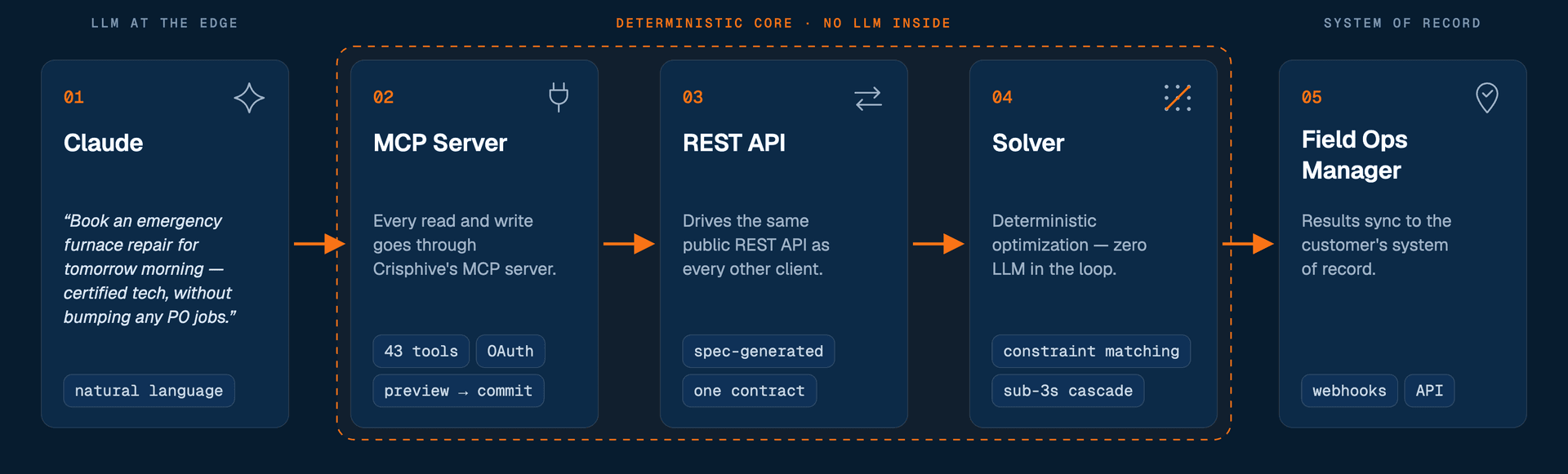
Le parcours d'une demande — le modèle de langage reste aux extrémités ; le planning appartient au solveur.
<3spour calculer une replanification en cascade complète
43outils de planification derrière une seule URL
0planning halluciné — les plans viennent du solveur, pas du LLM
Les replanifications en cascade sont résolues en moins de 3 secondes, mesuré sur une simulation de flotte à Ottawa avec 20 sites et 3 véhicules, où mobilisation, temps de trajet, courses d'approvisionnement et pauses sont des contraintes dures.
Tous les clients utilisent la même URL. OAuth vous connecte en tant que propriétaire de l'entreprise ; une clé API Sandbox (chsk_test_…) donne un environnement de test isolé où expérimenter sans risque.
claude.ai / Claude Desktop (OAuth)
Le plus rapide : ouvrez la fiche Crisphive dans l'annuaire de connecteurs et connectez-vous en un clic. Ou ajoutez-le à la main — Paramètres → Connecteurs → Ajouter un connecteur personnalisé, collez l'URL du serveur, puis connectez-vous en tant que propriétaire du compte Crisphive à l'ouverture de l'écran de consentement.
Claude Code
claude mcp add --transport http crisphive \
  https://api.crisphive.com/mcp
Conçu pour les opérations terrain à forte répartition
Un seul connecteur, pour chaque secteur à forte répartition que Crisphive planifie déjà — mêmes outils, mêmes contraintes, le vocabulaire de votre métier.
Accès minimal, approbation explicite — le connecteur ne voit que ce que les outils exposent.
OAuth en tant que propriétaire de l'entreprise
La connexion vous authentifie via OAuth — aucune clé API collée dans le chat. Révoquez l'accès à tout moment depuis les paramètres de connecteurs de Claude ou votre compte Crisphive.
Données de planification uniquement
Les outils couvrent les interventions, les ordres de travail, les clients, les équipes, les catalogues, les zones de service et la flotte. Les données de facturation et de paiement ne sont pas exposées au connecteur.
Le plan avant le changement
Tout ce qui déplace des interventions existantes revient sous forme de plan à examiner — interventions déplacées, nouveaux ETA, impact sur les SLA — et n'est validé qu'après votre approbation.
C'est le serveur Model Context Protocol officiel de l'API Crisphive — un serveur distant hébergé à l'adresse https://api.crisphive.com/mcp qui donne aux agents IA 43 outils pour la réservation d'interventions, les ordres de travail, la disponibilité de répartition, les clients, les catalogues de services, les effectifs des équipes, les zones de service et la flotte. Il n'y a rien à installer ni à exécuter.
Comment connecter Claude à Crisphive ?
Sur claude.ai ou Claude Desktop, allez dans Settings → Connectors → Add custom connector et collez https://api.crisphive.com/mcp — vous vous connecterez en tant que propriétaire de l'entreprise Crisphive via OAuth. Dans Claude Code, exécutez : claude mcp add --transport http crisphive https://api.crisphive.com/mcp
Le serveur MCP est-il facturé en supplément ?
Non. L'accès MCP est inclus dans toutes les offres Business ainsi que dans la Sandbox développeur gratuite. Les appels MCP, les cascades, les replanifications et les lectures ne sont jamais facturés — la facturation ne compte que les interventions réelles.
Quels clients MCP sont pris en charge ?
Tout client qui prend en charge les serveurs MCP distants via Streamable HTTP — claude.ai, Claude Desktop, Claude Code, ChatGPT, Gemini CLI, Cursor, VS Code, Windsurf, Cline, Zed et LM Studio, entre autres. Les clients qui ne parlent que stdio peuvent faire le pont avec mcp-remote.
Est-ce la même chose que le serveur MCP de Crisp ?
Non. Le serveur MCP de Crisphive expose des outils de planification d'opérations terrain — répartition, optimisation de tournées, planification des équipes et ordres de travail — et il est développé par WicWac Inc. à Ottawa, au Canada. Il n'a aucun lien avec Crisp (la plateforme de messagerie de support client) ni avec Krisp (l'application de suppression de bruit).
La planification est-elle faite par l'IA ?
Non — et c'est tout l'intérêt. Claude interprète votre demande ; le planning lui-même est calculé par le solveur déterministe sous contraintes de Crisphive. Même entrée, même planning, à chaque fois — un modèle de langage ne place, ne déplace et n'invente jamais une intervention.
Claude peut-il replanifier des interventions sans mon approbation ?
Non. Les changements qui touchent des interventions existantes reviennent d'abord sous forme de plan : Claude montre quelles interventions bougent, les nouveaux ETA et l'impact sur les SLA, et rien n'est validé avant votre approbation.
À quelles données le connecteur accède-t-il ?
Uniquement vos données de planification Crisphive, via OAuth en tant que propriétaire de l'entreprise : interventions, ordres de travail, clients, équipes, catalogues de services, zones de service et flotte. Les données de facturation et de paiement ne sont pas exposées, et une clé API Sandbox garde vos essais dans un environnement de test isolé.
Votre planning, audité en 48 heures
Envoyez-nous une vraie journée de votre tableau de répartition. Nous la reconstruisons avec le solveur déterministe qui alimente ce connecteur et nous vous montrons les heures facturables que vous avez laissées de côté.